
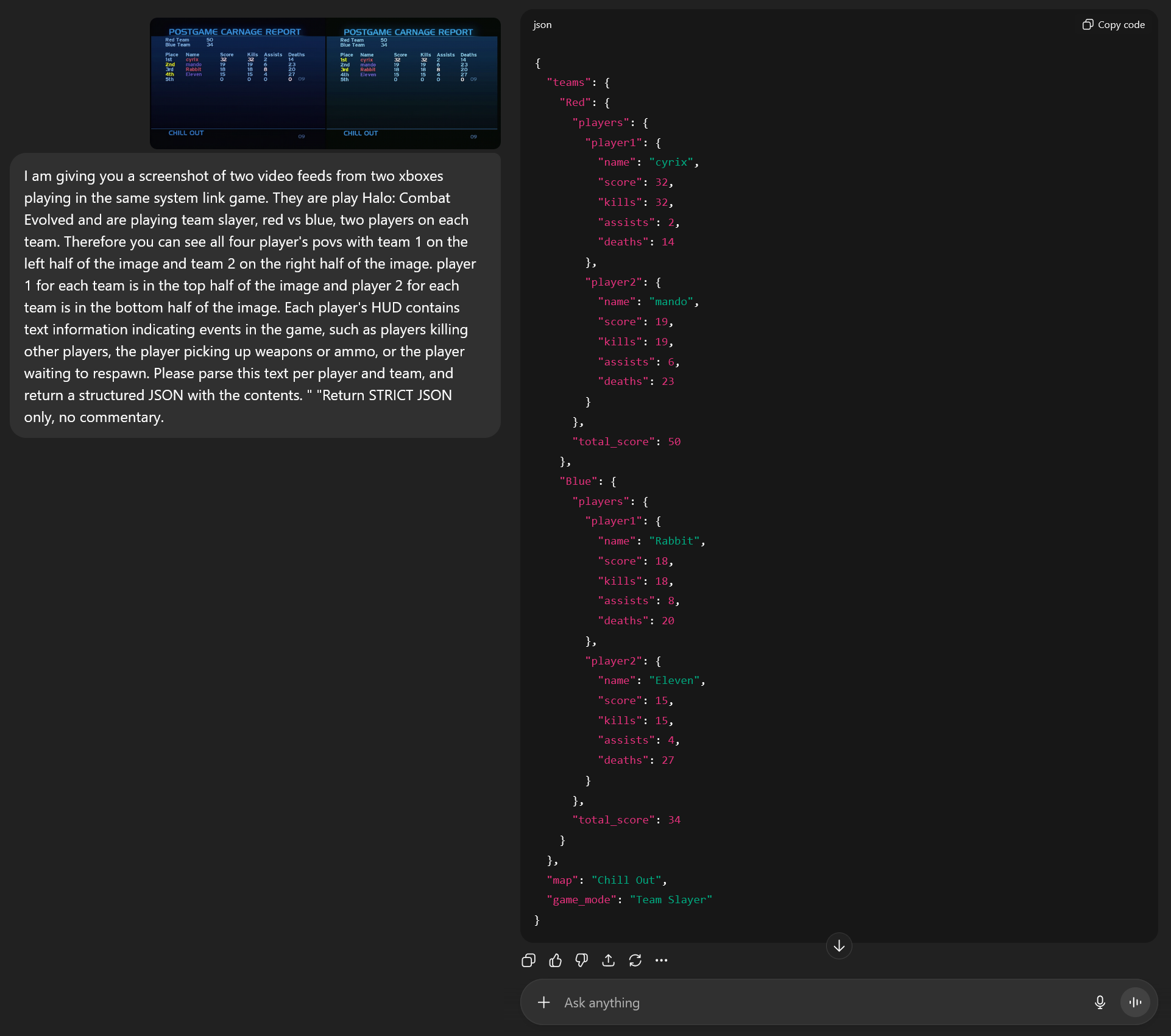
Part of why I was interested in capturing every POV from Beach LAN was so that I could get the stats from every game played. Twenty four years into playing Halo 1, we've done a lot to optimize the game, but one aspect that I think would be interesting is getting actual stats from games played and seeing what that tells us. In order to do that, we need to find some way to extract stats from the game.
While there are a myriad of ways to do this, including some that are more sophisticated, the easiest way is to just take screenshots of the Postgame Carnage Report (PGCR) and log everything on that screen. Since Halo 1 does not have a lot of stats, you could do this by hand. In fact, I think Ogre 2 did this back in the day. He was known for having a digital camera specifically to take photos of the PGCR and putting that info into spreadsheets.
So how did I do this for the 650ish games that were played at Beach LAN? Below is what I roughly did and is an approach anyone should be able to do. Anyone could do this by hand, and the better programmer you are the faster it will go.
For each video file I had, I ran a script that did more rudimentary OCR on just the top header of a PGCR screen. You see, that part which says "POSTGAME CARNAGE REPORT" is always going to be in that section, is the biggest text on the page, and therefore an older OCR library like pytesseract can work on it just fine. I actually created this script 7 years ago.
It still works just fine but I did make some slight tweaks to it for this specific project. Namely, for each station I put the two POV's side-by-side and processed that as one video file.
Before you wonder, why not just run pytessract on all of the text on the image? Yeah, I tried that 7 years ago and it Just Didn't Work. I believe the font used doesn't separate out visually similar characters well enough (like l/1/I, and even some less obvious ones like E/3/R). I spent some time trying to work through that, because if you think about it the text on this screen has a ton of constraints we can work with. All of the text is in fixed positions. We know the range of values for every number (Kills are going to be 1-50, etc.). We can even do data correction because we know one team's kills should add up to another team's deaths, among other things. But ultimately after putting in a good honest effort at trying to make that work enough to be useful it just wasn't consistent enough. Flash forward 5 years, and LLM's became a thing. Now with a good LLM it seems like text OCR has gotten significantly better, but I'll talk about that in the next section.
So after running that script on each video file, I had folders of screenshots. In the screenshot names, I had the exact time in the video that screenshot is for, that way we can do some checks here. Primarily the thing we are checking is that every PGCR was screenshotted, and we can do that by looking at the time between screenshots and seeing if there are any huge gaps. For instance a game takes like 7-15 minutes roughly so if there's a 30 minute gap, then maybe a game was missed. So there were a few instances where I went back and manually took a screenshot.
Here is the script I used to handle 2 side-by-side POVs.
Last year, I generated stats for Beach LAN 13 but I did them "by hand." What I did was I asked ChatGPT to produce a JSON of all the stats for each game, then I put the response into a spreadsheet along with some non-stats game metadata (like the station, the screenshot name, etc), before using that spreadsheet to insert everything into a database. That way I could do some manual checking of the JSON's first.
That worked fine, but took forever. So this year I went ahead a wrote a quick python script to automate prompting ChatGPT. OpenAI has API access and it does cost money, but it only cost me like $2 total to do everything for Beach LAN 14 (You can test the API out for free you just can only send like 3 requests a day).
Here is the prompt I used: I am giving you a screenshot of two video feeds from two xboxes playing in the same system link game. They are play Halo: Combat Evolved and are playing team slayer, red vs blue, two players on each team. Therefore you can see all four player's povs with team 1 on the left half of the image and team 2 on the right half of the image. player 1 for each team is in the top half of the image and player 2 for each team is in the bottom half of the image. Each player's HUD contains text information indicating events in the game, such as players killing other players, the player picking up weapons or ammo, or the player waiting to respawn. Please parse this text per player and team, and return a structured JSON with the contents. " "Return STRICT JSON only, no commentary.
So the script generally worked as follows:
-For each image in a folder, send it and the prompt to the API endpoint
-Take the response from the API endpoint, make sure it's trimmed down to just the JSON.
-Write that to a CSV file.
Here is that script
Once we a had CSV file with the image name and the JSON response, I used that JSON to put all of the data into a database. The staging database I used was SQLite3 and I used "DB Browser for SQLite" to look through it. This was great because now everything was in tabular form and I could start scrubbing things.
While ChatGPT's JSON's were quite good and consistent, they were not perfect. Even if they were, the in-game names still have to be mapped to the player's actual gamertag. For that, I took notes throughout the week to see what alts everyone was playing on. There were some I missed, but I just had to ask around to get those.
Once it was in an SQLite database, I just did some very high level data scrubbing. Made sure everything looks good and there was nothing wrong with the JSON data. The JSON's ChatGPT produced sometimes would have slightly different structures (for instance calling red team "Red", "Red Team", and "red_team" versus just picking one and sticking with it), so the goal here was to just make sure the stucture was consistent in the database. Once it was, I used a small python script to insite everything into a MySQL DB on my web server.
Here is the script to load into the SQLite DB
Here is the script to load into the MySQL DB
In terms of data errors, there was nothing too crazy. One big thing that changed this year was objective games were played, as well a 3v3 matches. Some of my stuff had baked in the assumption every game was 2v2 slayer, including my prompt. So when it came to parsing an objective game's PGCR, some weirdness happened with score values being dropped, or columns being transposed onto others (like the time each player held the ball in odball being their value for kills, for example). So with everything in the database I could sort columns by min/max and see if the outliers are the results of data errors.
That worked quite well, but that still meant some manual corrections were in order. Off the top of my head, the biggest issuse would be things like:
That last one was probably the toughest thing for the LLM to parse. In the prompt, I forgot to explicitly tell it to determine a player's team based on the color of their name (something I did last year). Even when I did do that last year, it was probably the thing it did with the highest error rate. Either way, fortunately for us we can use the constraints of the game to correct this. Think about it, there are only four players and the odds of their kills/deaths combination all being unique is fairly high. Assuming that is the case, and we know a slayer game is to 50, we can typically determine which two players are on the winning team and which two are on the losing team. So armed with that knowledge, I asked ChatGPT to whip up some DB queries to reconcile the games with those issues.
One step I forgot to kind of do that I did last year with all of the manual data entry was add the time elapsed in the game. You see in latest versions of Halo 1 we play there is a timer on screen. When the game is over and the PGCR is displayed, the minutes elapsed value is almost always still visible. Because of that, and the variance that comes with when the screenshot is taken post-game, I decided to ignore the seconds elapsed. We can still use this value for analysis.
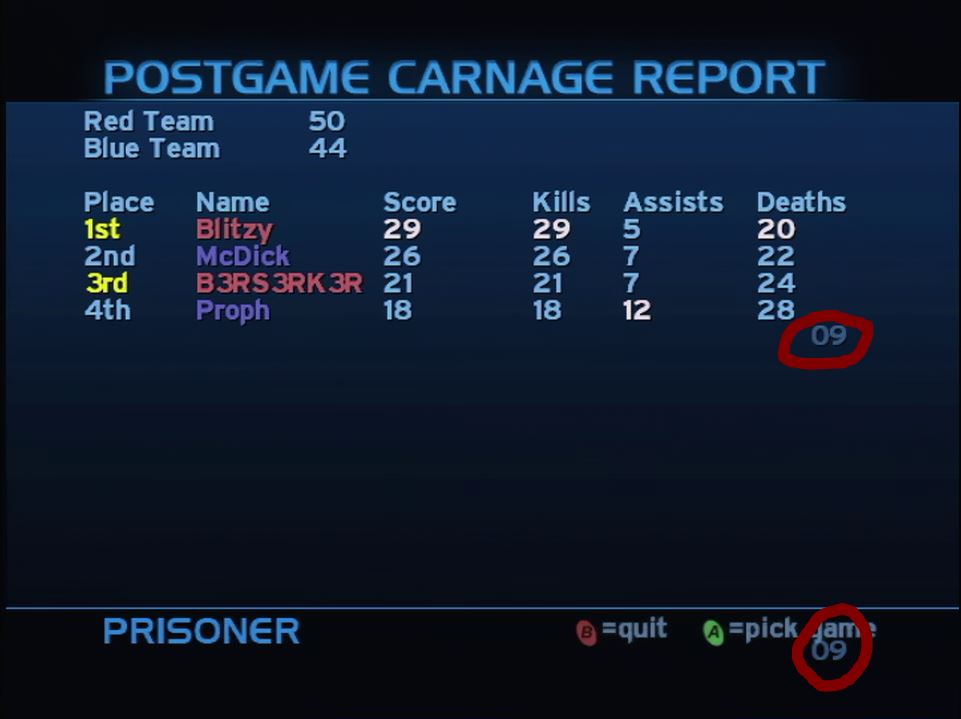
So to remedy that, and to do one final real manual scrub through each game, I asked ChatGPT to create a web page that would go through each game, display the stats we had in the database, and then show the screenshot itself so I could correct things like the map name, time elapsed, and swap team colors. I also just had the database open on another tab so I could do more intense corrections.
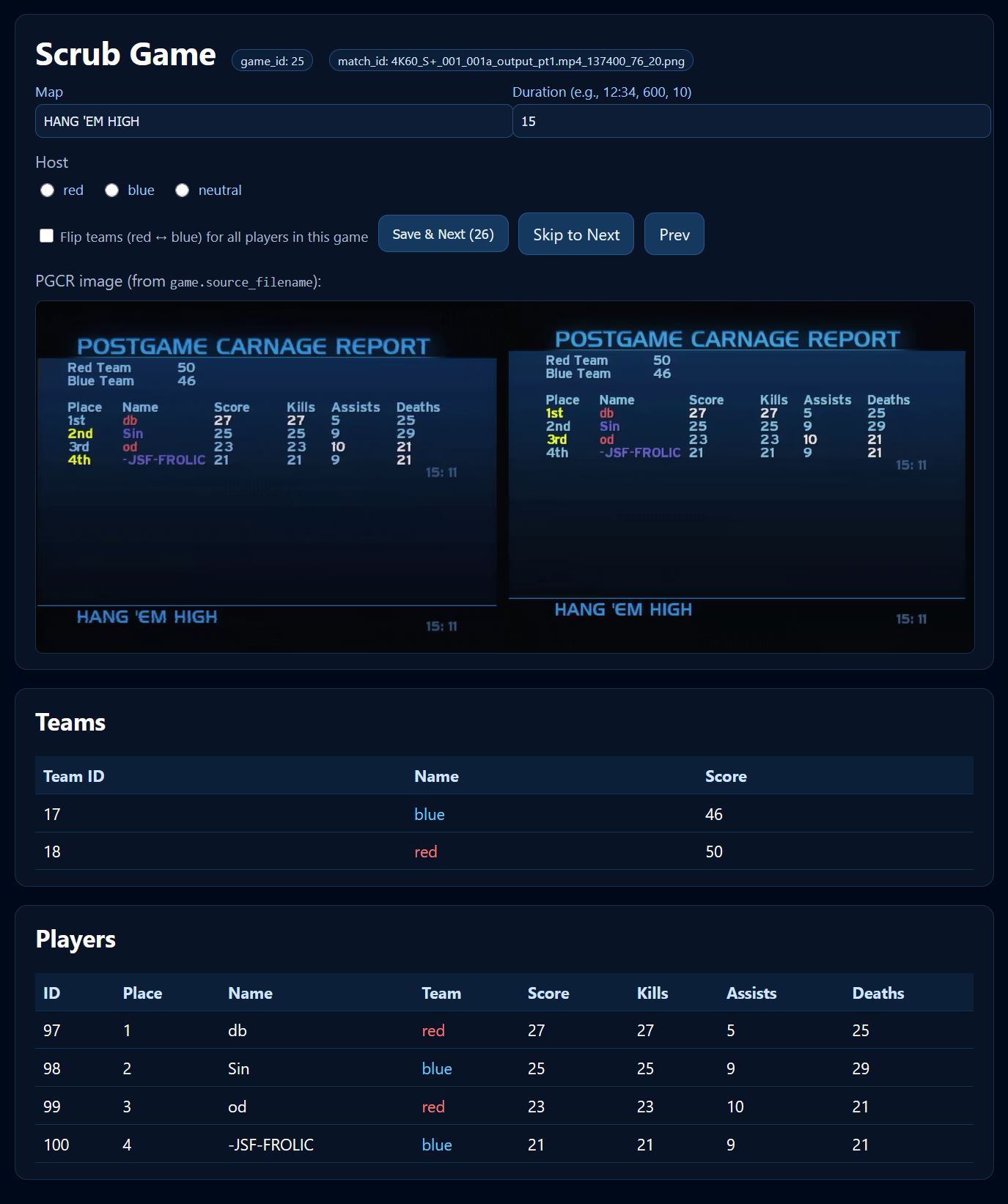
After the database was more or less ready, it was time to build a basic website. What's kind of crazy was I basically just took the source code for Beach LAN 13's stat website, threw it at ChatGPT and told it to update everything based on the new database for Beach LAN 14. I did this for each page and it basically just worked. I made some tweaks for things I wanted to add or fix, but I didn't have to do any debugging on the code ChatGPT gave me.
You may ask, why didn't I use the same database as I did for Beach LAN 13? In short, I learned some lessons and wanted to start fresh. In long, the main reason behind that was that I structured the schema of the BL13 DB to reflect the possiblity of 1 or 2 postgame carnage reports would be in the DB for one given game. You see the way I captured Beach LAN 13 was different and it took a lot more effort to identify if which two video feeds were of the same game. If there's enough interest, I can migrate Beach LAN 13 stats into this new database as it has been set up to handle multiple events.
After that, I was basically done. I used the site to again do some data validation and checks. There were some more data issuse that were corrected. After that, was when I finally mapped in-game names to gamertags so a given player would be mapped across all games they played, regardless of their in-game name. I waited to do this last because it was one less step in debugging the data.
From there, I let everyone know about the site. Some people noticed a few more errors, but as of this blog post I am extremely confident in everything. For having to process roughly 650 games, the time spent this year versus last year was significantly less (and last year had significantly less games).
So that's it. I think I'll continue to do this for major LAN's going forward. Maybe the process will continue to get streamlined. We can read memory for an emulated neutral host, so there is a pathway to fully integrating that into a stats site that runs itself.
But for now, if you have any questions or want to do anything like this, please let me know. I am glad to give you my notes and help out.
Here is the Beach LAN 14 Stats Website.
Here is all of the VOD footage from Beach LAN 14
I'm sure I did. Please correct me in my discord channel