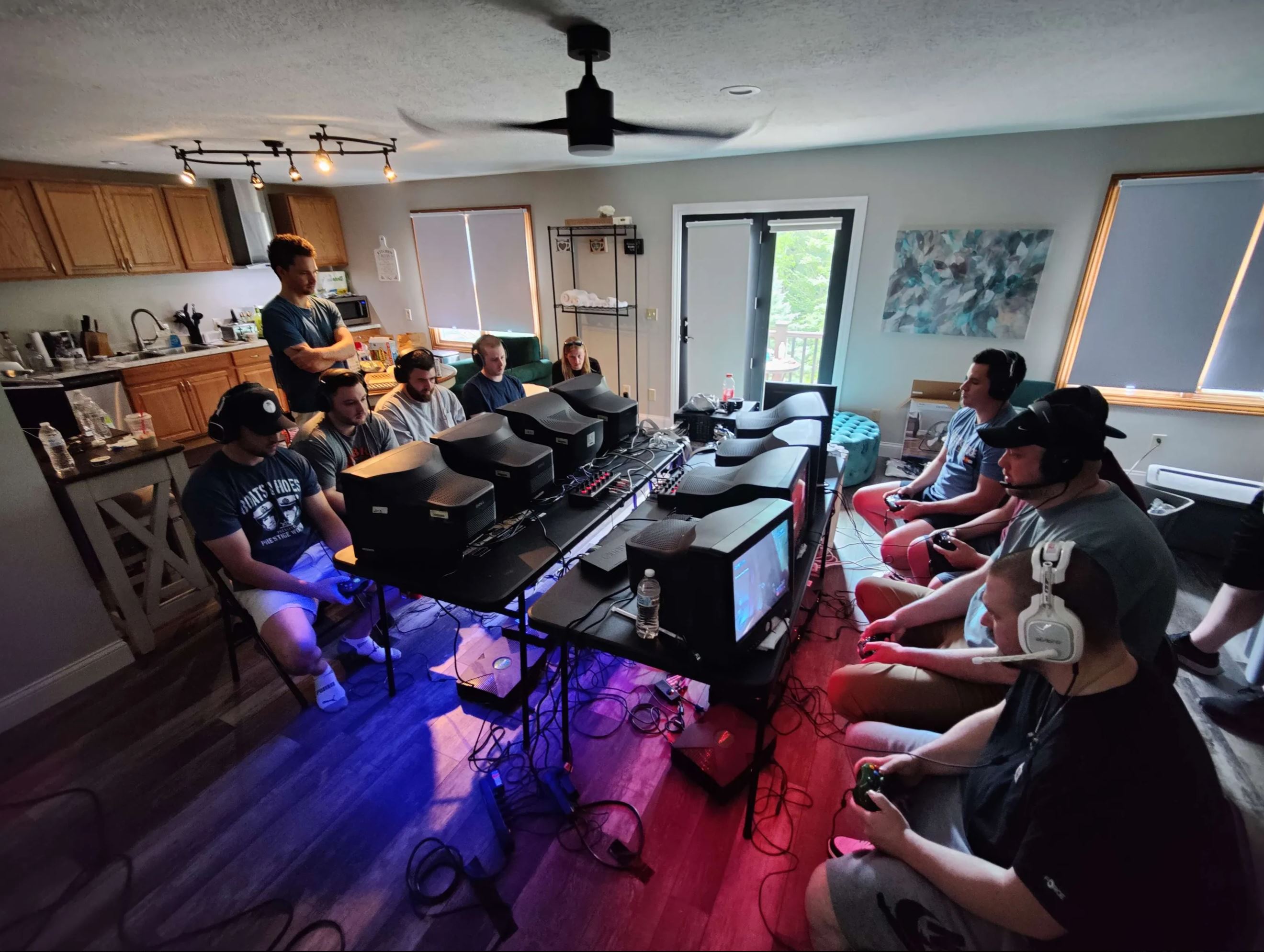
In July 2025, The Other Guys held a LAN event featuring two full 4v4 Halo stations in Columbus, Ohio. We picked Columbus because it’s where I keep a storage unit packed with enough matching CRT monitors, original Xbox consoles, and miscellaneous hardware to set up a proper classic LAN party. It was the culmination of years of hardware hoarding finally being put to the test.
Overall, the LAN was a success, but as it was my first time putting all of this gear into action at once, I ran into numerous issues—some anticipated, many not. I had to improvise frequently, falling back on Plan B, C, and sometimes even D just to keep both stations fully operational.
In the lead-up to the LAN, I paid for an extra storage unit to act as a staging area. Previously, my gear was scattered across multiple locations: my primary storage unit, my home, and even my car. Bringing everything together in one place made it much easier to inventory what I had, test components, and stage everything for a quick setup once people arrived.
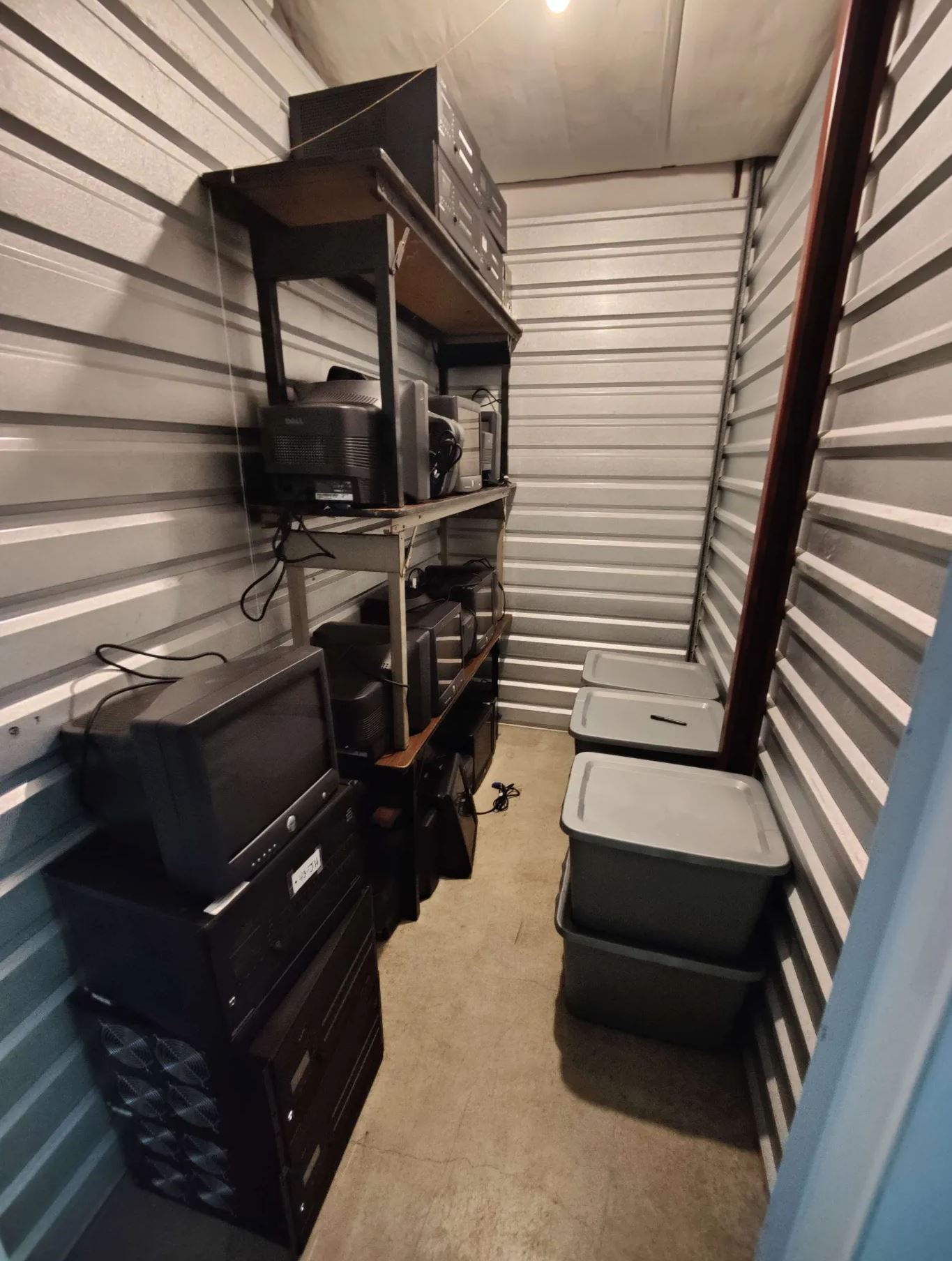
I own over two dozen Dell M782 CRT monitors, which are ideal for Halo 2 LAN play. Unfortunately, beyond confirming that they power on and accept a VGA signal, there's not much else I can realistically test. So I stacked 16 of them inside the storage unit and crossed my fingers they’d hold up under real LAN conditions.
To organize Xboxes and associated cabling, I bought large totes—each housing four complete setups. That included the Xbox console, a Turtle Beach TM1 mixer, and all necessary cabling. Monitors were kept separate.
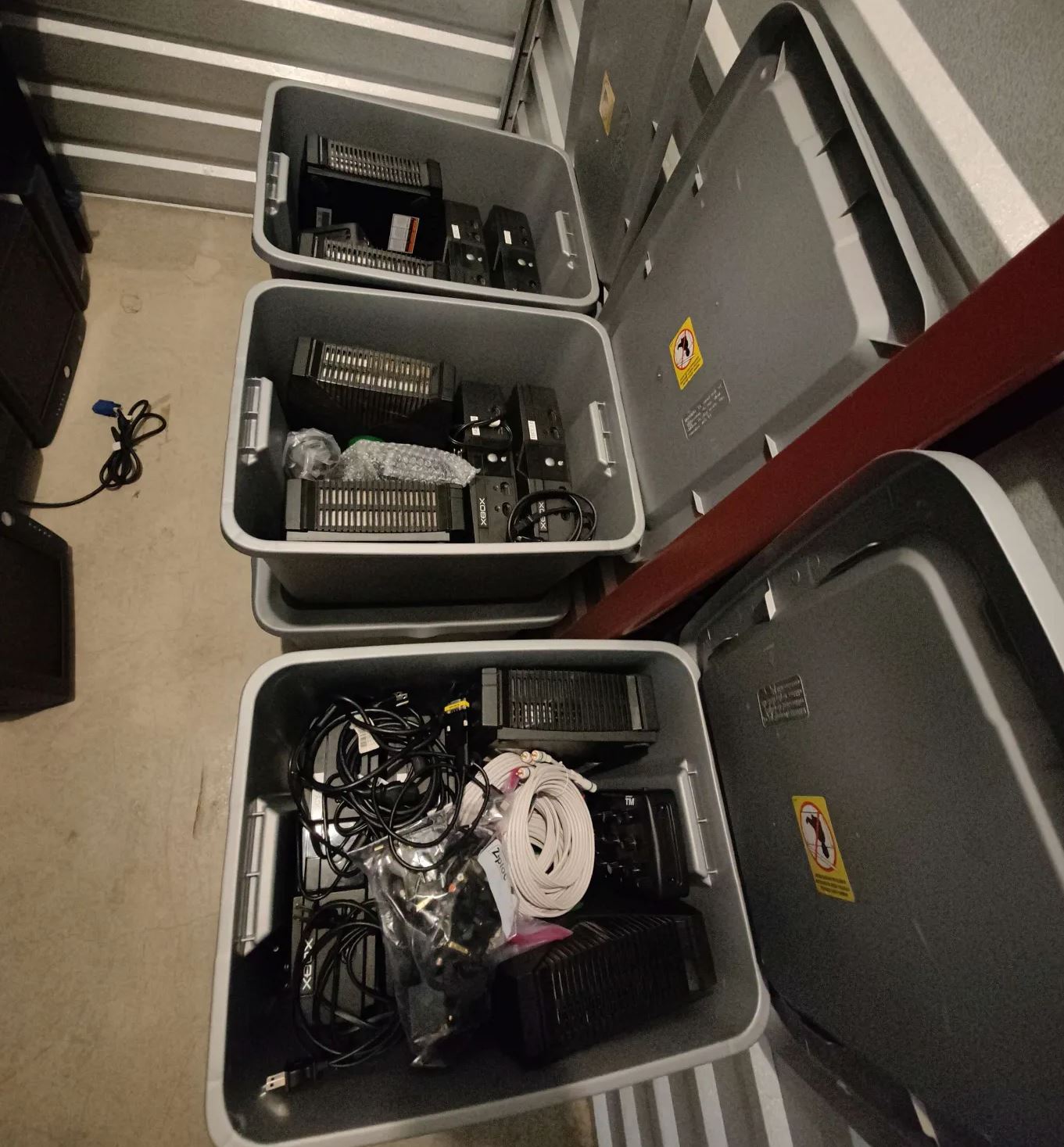
For audio, we used the Turtle Beach TM1 mixers. These mixers support up to six stations. They provide both digital and analog inputs/outputs per station and are far simpler to deal with than daisy-chaining multiple Astro MixAmps. The TM1 requires only one power connection and simplifies everything into a centralized hub.
I had initially assumed the TM1 would be able to convert digital optical audio to analog stereo, so we could use the higher-quality optical signal for players and the analog signal for streaming. But while reading the manual I discovered the TM1 cannot perform that conversion. This meant I needed to split the analog stereo signal coming from each Xbox's HD AV Pack, and route it to both the mixer and the recording setup.
I was able to scrounge enough audio cables to make this happen, but ran into another issue: many of my HDMI-to-VGA adapters didn’t include a 3.5mm audio out. Only about 8 did, so Station 2 had to compromise by limiting audio capture to one POV per side. On top of that, some cable runs were too short, meaning the players sitting on the ends didn’t have enough slack in their headset cords.
One of the major challenges of using CRTs is that they require VGA input, but original Xboxes only output component video. Enter the Crestron DM-MD8x8, a professional 8x8 AV switcher capable of laglessly converting component to VGA while also outputting HDMI for streaming/recording. It calls itself an 8x8 switcher (8 input, 8 output), but it's really an 8x16 switcher (because every input has a local output, which is what we used for video conversion). This means for one station, everyone can be on the same switcher eliminiating a ton of cables and any chance some placebo-head head cases.
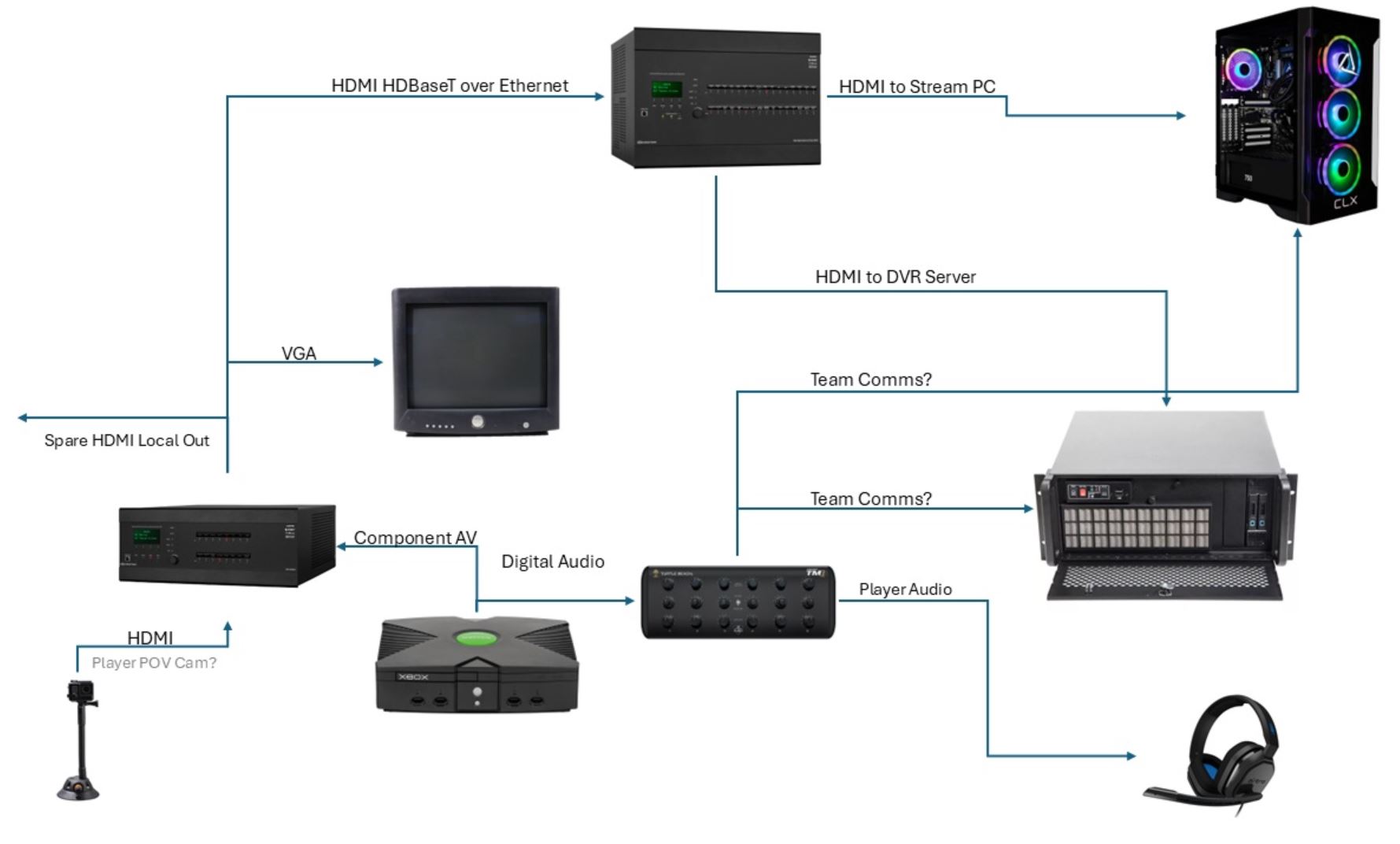
Each station used DMC-DVI input cards combined with passive RGB to DVI adapters to feed video into the switcher. From there, HDMI-to-VGA adapters took the signal to the Dell M782 CRTs. HDMI outputs were routed to capture cards for streaming.
The biggest issue here? I only brought 8 RGB to DVI adapters. For Station 2, I had to combine VGA to DVI and RGB to VGA adapters to make it work. Thankfully, it did. If not, I would’ve had to dig through backup component-to-VGA solutions.
Component cable thickness also became a problem. At Station 2, the Xboxes were placed on the floor due to limited table space, which put upward strain on the RCA connectors—causing monitor flickering. We taped the cables to reduce tension, but the real fix is raising the monitors or lowering the Xboxes. I plan to buy monitor risers so CRTs can sit higher and Xboxes can sit underneath them.
I also found that several Dell M782s were dimmer than expected. This affects gameplay clarity, especially at 480p on a 17-inch screen. Fortunately, I had backup Gateway VX755 monitors. In future events, I’ll pre-test brightness levels and organize monitors by nits.
One of my goals was to run a stat-tracking dedicated server using Xemu and the xemuh2stats launcher (nicknamed WhatTheFuck). This tool hooks into Xemu’s memory to extract real-time game data. It worked on my main PC and laptop, but refused to work on any freshly installed machines.
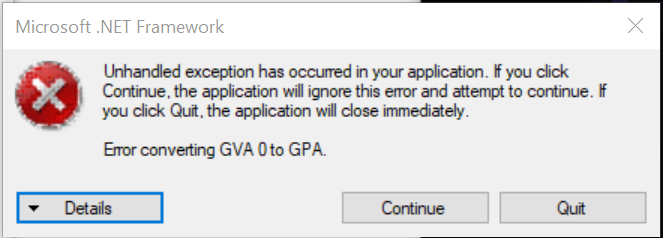
I brought my main laptop as the main station’s dedi, but even it started showing a weird "Error converting GVA 0 to GPA" issue on site. Despite that, it hosted games just fine.
For Station 2, I intended to use a Shuttle XPC mini PC. But it only had HDMI and DP outputs, while the monitors I brought only had VGA and DVI. I made a trip back home to grab an HDMI-to-DVI cable. But since DVI lacks audio and Xemu refuses to launch without an audio device, I plugged in one of the cheap USB sound cards I had brought for capture. That trick worked and got us back on track.
Initially, I planned to record all 8 POVs and run a livestream with real-time overlays. That plan fell apart quickly thanks to flaky capture cards.
I bought a huge lot of Avermedia C727 capture cards. But they apparently all are broken. Even after fighting the drivers they still caused choppy feeds on the off chance they did work. I tried stacking 8–16 of them in a single machine, but it constantly would throw driver errors on some of them.
Two days before the LAN, I threw in a 4-port HDMI PCIe capture card and a few USB HDMI dongles. Only the 4-port and two USB cards worked, so we limited the main station stream to 4 POVs.
OBS Studio chewed up 70% CPU on the streaming PC. Any scene or filter tweak caused the stream to lag. Lesson learned: next time, use a stronger PC.
For Station 2, I used a cheap quad HDMI viewer/capture box from AliExpress. These were $30 when I bought them (now $150+). It only outputs one audio stream but works fine for multi-POV visuals. I connected it to a USB capture device and OBS picked it up instantly. Easy win.
I softmodded all Xboxes, installed Halo 2 and DLC, and verified they could load into a match. But I forgot to preload gametypes. I had a file from MVC, but the gametypes in it weren't actually MLG gametypes. Players had to manually recreate them.
One or two Xboxes died—no surprise since they were still running old IDE hard drives. I plan to replace those with CF cards using high-speed UDMA modes before the next LAN.
Despite all the chaos, everyone had a great time. The stream performed well, we got our tournament stats, and we captured a ton of footage. I walked away with invaluable insight into what worked, what didn’t, and what needs to be fixed for next time.
Beach LAN is next on deck, and I’ll be blogging about how I used this experience to improve the side station setup for that event. Who knows—maybe we’ll even start using HDMI-modded Xboxes soon.
Did I miss anything? Let me know in my Discord.